🏆 20 points available
▶️ First, run the code cell below to import unittest, a module used for 🧭 Check Your Work sections and the autograder.
# DO NOT MODIFY THE CODE IN THIS CELL
import unittest
import base64

tc = unittest.TestCase()
🎯 Import packages
👇 Tasks
✔️ Import the following Python packages.
pandas: Use aliaspd.numpy: Use aliasnp.sqlite3: No alias
# YOUR CODE BEGINS

# YOUR CODE ENDS
🧭 Check Your Work
Run the code cell below to test your solution.
✔️ If the code cell runs without errors, you’re good to move on.
❌ If the code cell produces an error, review your code and fix any mistakes.
# DO NOT CHANGE THE CODE IN THIS CELL
tc.assertTrue(
    "pd" in globals(), "Check whether you have correctly imported Pandas with an alias."
)
tc.assertTrue(
    "np" in globals(), "Check whether you have correctly imported NumPy with an alias."
)
tc.assertTrue(
    "sqlite3" in globals(),
    "Check whether you have correctly imported the sqlite3 package.",
)
📌 Populate a database table from a CSV file
▶️ Run the code below to populate the loans table.
conn = sqlite3.connect("lending-club-loan-results.db")
c = conn.cursor()

tables = list(
    pd.read_sql_query("SELECT * FROM sqlite_master WHERE type='table';", con=conn)[
        "tbl_name"
    ]
)

if "loans" in tables:
    c.execute(f"DELETE FROM loans")
    conn.commit()

pd.read_csv(
    "https://github.com/bdi475/datasets/raw/main/lending-club-loan-results.csv.gz",
    compression="gzip",
).to_sql(name="loans", index=False, con=conn, if_exists="append")

conn.close()
🧭 Check Your Work
Run the code cell below to test your solution.
✔️ If the code cell runs without errors, you’re good to move on.
❌ If the code cell produces an error, review your code and fix any mistakes.
# DO NOT CHANGE THE CODE IN THIS CELL
conn_checker = sqlite3.connect("lending-club-loan-results.db")
table_to_check = "loans"

# Check if table exists
user_tables = list(
    pd.read_sql_query(
        'SELECT * FROM sqlite_master WHERE type="table";', con=conn_checker
    )["tbl_name"]
)
tc.assertTrue(
    table_to_check in user_tables,
    f"{table_to_check} does not exist in your NWT.db file!",
)

conn_checker.close()
The table below describes the columns in the loans table.
| Field | Description |
|---|---|
| loan_amnt | listed amount of the loan applied for by the borrower |
| int_rate | interest rate on the loan (between 0 and 1) |
| term_in_months | number of payments on the loan - either 36 or 60 months |
| grade | assigned loan grade (A, B, C, D, E, F, G) |
| job_title | job title supplied by the Borrower when applying for the loan |
| home_ownership | home ownership status provided by the borrower during registration (RENT, OWN, MORTGAGE) |
| annual_inc | self-reported annual income provided by the borrower during registration |
| loan_status | result of the loan (Fully Paid or Charged Off) |
| purpose | a category provided by the borrower for the loan request |
| did_default | 0 == paid in full, 1 == default (charged off) |
▶️ Run the code below to display the first 10 rows of the loans table.
conn = sqlite3.connect("lending-club-loan-results.db")
display(pd.read_sql_query("SELECT * FROM loans LIMIT 10", con=conn))
conn.close()
🎯 Challenge 1: Find high profile defaults
👇 Tasks
✔️ Write a query that:
selects all columns,
from the
loanstable,where the
job_titleis"Attorney",annual_incis greater than300000, anddid_defaultis1
✔️ Store your query to a new variable named
query_high_profile_defaults.✔️ The order of rows does not matter.
🔑 Expected output
| loan_amnt | int_rate | term_in_months | grade | job_title | home_ownership | annual_inc | loan_status | purpose | did_default | |
|---|---|---|---|---|---|---|---|---|---|---|
| 0 | 15000 | 0.0916 | 36 | B | Attorney | MORTGAGE | 309000 | Charged Off | debt_consolidation | 1 |
| 1 | 35000 | 0.1344 | 36 | C | Attorney | RENT | 340000 | Charged Off | credit_card | 1 |
| 2 | 35000 | 0.1541 | 60 | D | Attorney | MORTGAGE | 350000 | Charged Off | credit_card | 1 |
| 3 | 35000 | 0.1709 | 36 | D | Attorney | RENT | 450000 | Charged Off | debt_consolidation | 1 |
# YOUR CODE BEGINS

# YOUR CODE ENDS

conn = sqlite3.connect("lending-club-loan-results.db")
df_result = pd.read_sql_query(query_high_profile_defaults, con=conn)
display(df_result)
conn.close()
🧭 Check Your Work
Run the code cell below to test your solution.
✔️ If the code cell runs without errors, you’re good to move on.
❌ If the code cell produces an error, review your code and fix any mistakes.
_test_case = "part-01"
_points = 6

conn = sqlite3.connect("lending-club-loan-results.db")
decoded_query = base64.b64decode(
    b"ClNFTEVDVCAqCkZST00gbG9hbnMKV0hFUkUgKGpvYl90aXRsZSA9ICJB\
dHRvcm5leSIpIEFORCAoYW5udWFsX2luYyA+IDMwMDAwMCkgQU5EIChkaWRfZGVmYXVsdCA9IDEpOwo="
).decode()
df_check = pd.read_sql_query(decoded_query, con=conn)
pd.testing.assert_frame_equal(
    df_result.sort_values(df_result.columns.tolist()).reset_index(drop=True),
    df_check.sort_values(df_check.columns.tolist()).reset_index(drop=True),
)
conn.close()
🎯 Challenge 2: Stats by loan grade
👇 Tasks
✔️ Write a query that summarizes the average interest rate and the default rate for each loan grade.
✔️ Use the following column names:
grade: Grade of each loan (e.g., “A”, “B”, ..., “G”)avg_int_rate: Average interest rate for each loan gradedefault_rate: Default rate for each loan gradeThis is the average of
did_defaultcolumn.
✔️ Sort the result by
gradein ascending order.✔️ Store your query to a new variable named
query_stats_by_grade.
🔑 Expected output
| grade | avg_int_rate | default_rate | |
|---|---|---|---|
| 0 | A | 0.0704255 | 0.0628832 |
| 1 | B | 0.104537 | 0.139501 |
| 2 | C | 0.138426 | 0.233738 |
| 3 | D | 0.176442 | 0.31796 |
| 4 | E | 0.211539 | 0.418802 |
| 5 | F | 0.253798 | 0.472141 |
| 6 | G | 0.282657 | 0.512246 |
# YOUR CODE BEGINS

# YOUR CODE ENDS

conn = sqlite3.connect("lending-club-loan-results.db")
df_result = pd.read_sql_query(query_stats_by_grade, con=conn)
display(df_result)
conn.close()
🧭 Check Your Work
Run the code cell below to test your solution.
✔️ If the code cell runs without errors, you’re good to move on.
❌ If the code cell produces an error, review your code and fix any mistakes.
_test_case = "part-02"
_points = 7

conn = sqlite3.connect("lending-club-loan-results.db")
decoded_query = base64.b64decode(
    b"ClNFTEVDVAogICAgZ3JhZGUsCiAgICBBVkcoaW\
50X3JhdGUpIEFTIGF2Z19pbnRfcmF0ZSwKICAgIEFWRyhkaWRfZGVmYXVsdCkgQVMgZGVmYXVsdF9yYXRlCkZST00gbG9hbnMKR1JPVVAgQlkgZ3JhZGUKT1JERVIgQlkgZ3JhZGU7Cg=="
).decode()
df_check = pd.read_sql_query(decoded_query, con=conn)
pd.testing.assert_frame_equal(
    df_result.reset_index(drop=True), df_check.reset_index(drop=True)
)
conn.close()
🎯 Challenge 3: Stats by loan purpose
👇 Tasks
✔️ Write a query that summarizes the number of loans, average interest rate, and the default rate for each loan purpose.
✔️ Use the following column names:
purpose: Purpose of each loan (e.g., “debt_consolidation”, “credit_card”)num_loans: Number of loans for each loan purposeavg_int_rate: Average interest rate for each loan purposedefault_rate: Default rate for each loan purposeThis is the average of
did_defaultcolumn.
✔️ Sort the result by
num_loansin descending order.✔️ Store your query to a new variable named
query_stats_by_purpose.
🔑 Expected output
| purpose | num_loans | avg_int_rate | default_rate | |
|---|---|---|---|---|
| 0 | debt_consolidation | 118382 | 0.133737 | 0.217685 |
| 1 | credit_card | 45718 | 0.114085 | 0.173127 |
| 2 | home_improvement | 14192 | 0.12765 | 0.184188 |
| 3 | other | 10829 | 0.143714 | 0.215071 |
| 4 | major_purchase | 4624 | 0.129519 | 0.222535 |
| 5 | small_business | 3294 | 0.162964 | 0.319065 |
| 6 | medical | 2419 | 0.139562 | 0.222819 |
| 7 | car | 2059 | 0.120086 | 0.154444 |
| 8 | moving | 1302 | 0.152251 | 0.24424 |
| 9 | vacation | 1258 | 0.134918 | 0.197933 |
| 10 | house | 1042 | 0.156619 | 0.255278 |
# YOUR CODE BEGINS

# YOUR CODE ENDS

conn = sqlite3.connect("lending-club-loan-results.db")
df_result = pd.read_sql_query(query_stats_by_purpose, con=conn)
display(df_result)
conn.close()
🧭 Check Your Work
Run the code cell below to test your solution.
✔️ If the code cell runs without errors, you’re good to move on.
❌ If the code cell produces an error, review your code and fix any mistakes.
_test_case = "part-03"
_points = 7

conn = sqlite3.connect("lending-club-loan-results.db")
decoded_query = base64.b64decode(
    b"ClNFTEVDVAogICAgcHVycG9zZSwKICA\
    gIENPVU5UKCopIEFTIG51bV9sb2FucywKICAgIEFWRyhpbnRfcmF0ZSkgQVMgYXZnX\
    2ludF9yYXRlLAogICAgQVZHKGRpZF9kZWZhdWx0KSBBUyBkZWZhdWx0X3JhdGUKRlJ\
    PTSBsb2FucwpHUk9VUCBCWSBwdXJwb3NlCk9SREVSIEJZIG51bV9sb2FucyBERVNDOwo="
).decode()
df_check = pd.read_sql_query(decoded_query, con=conn)
pd.testing.assert_frame_equal(
    df_result.reset_index(drop=True), df_check.reset_index(drop=True)
)
conn.close()
🍸 Submitting your notebook
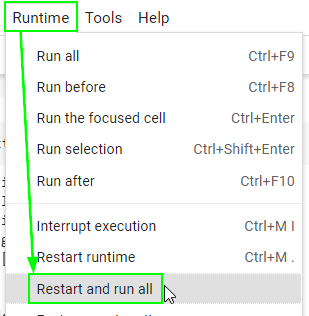
There is one final step before exporting the notebook as an .ipynb file for submission. Restart your runtime (kernal) and run all cells from the beginning to ensure that your notebook does not contain any error.
Go to the “Runtime” (“Kernel” if you’re on Jupyter Lab) menu on top.
Select “Restart and run all”.
Make sure no code cell throws an error.
Failing to pass this step may result in a significant loss of points since the autograder will fail to run.
print("🎯 Restart and run all successful")