🏆 80 points available
🤠 Author: Park (ypark32@illinois
.edu) ✏️ Last updated on 3/20/2025
▶️ First, run the code cell below to import unittest, a module used for 🧭 Check Your Work sections and the autograder.
# DO NOT MODIFY THE CODE IN THIS CELL
import unittest

tc = unittest.TestCase()
💎 Case Overview
There are four Transportation Network Providers (often called rideshare companies 🚗) licensed to operate in Chicago. These rideshare companies are required to routinely report vehicle, driver, and trip information to the City of Chicago, which is published on the Chicago Data Portal. The latest vehicle dataset can be downloaded at registered vehicles dataset. The original dataset has been preprocessed to fit this case study.
The reporting is done on a monthly basis, as indicated by the REPORTED_YEAR and REPORTED_MONTH columns. For each registered vehicle at a given month, the following information is provided:
| Column Name | Description |
|---|---|
REPORTD_YEAR | The year in which the vehicle was reported |
REPORTED_MONTH | The month in which the vehicle was reported |
STATE | The state of the license plate |
MAKE | The make of the vehicle |
MODEL | The model of the vehicle |
COLOR | The color of the vehicle |
MODEL_YEAR | The model year of the vehicle |
NUMBER_OF_TRIPS | Number of trips provided in this month. Due to the complexities of matching, errors are possible in both directions. Values over 999 are converted to null as suspected error values that interfere with easy data visualization |
MULTIPLE_TNPS | Whether the vehicle was reported by multiple TNPs in this month. Matching is imperfect so some vehicle records that should have been combined may be separate. |
⚔️ Your Goal
In this case study, you’ll use Pandas to explore and analyze over 1 million monthly rideshare vehicle registrations. Below are some of the questions you’ll be answering.
How many total trips did drivers make between 2015 and 2024?
How many trips did drivers make per month on average between 2015 and 2024?
Do Lincoln drivers make more trips compared to the overall average?
Do any drivers drive a red Tesla?
Do any drivers drive a Porsche or a Hummer?
Are there any vehicles that are brand new?
Do drivers who drive for two or more rideshare companies (e.g., Uber and Lyft) make more trips on average compared to other drivers who drive for only one rideshare company?
Which automakers are popular amongst rideshare drivers?
Which automakers have the highest number of trips on average?
How many trips do drivers of the Japanese Big 3 automakers make on average?
Which make/model is the most popular amongst rideshare drivers?
How about car colors?
Notes
Vehicle registrations that made less than 100 monthly trips are excluded. If you’d like to use the full dataset, you can download the full data (~500 MB) at registered vehicles dataset.
A vehicle will likely be registered multiple times. For example, if a driver drives a Camry for 12 months, there will be 12 rows of duplicate vehicle information.
🎯 Part 1: Import numpy and pandas
👇 Tasks
✔️ Import the following Python packages.
pandas: Use aliaspd.numpy: Use aliasnp.
# YOUR CODE BEGINS

# YOUR CODE ENDS
🧭 Check Your Work
Run the code cell below to test your solution.
✔️ If the code cell runs without errors, you’re good to move on.
❌ If the code cell produces an error, review your code and fix any mistakes.
# DO NOT CHANGE THE CODE IN THIS CELL
_test_case = "part-01"
_points = 2

tc.assertTrue(
    "pd" in globals(), "Check whether you have correctly import Pandas with an alias."
)
tc.assertTrue(
    "np" in globals(), "Check whether you have correctly import NumPy with an alias."
)▶️ Run the code cell below to configure Pandas, create a new DataFrame named df_v from a ZIP file, and clone the dataset for intermediate checks.
# DO NOT CHANGE THE CODE IN THIS CELL
# Display precision of decimal places to 1
# Precision of decimal places does not have a significance in this case study
pd.set_option("display.precision", 1)

df_v = pd.read_csv(
    "https://github.com/bdi475/datasets/blob/main/chicago-ridesharing-vehicles-202409.zip?raw=true",
    compression="zip",
)

# Used to keep a clean copy
df_v_backup = df_v.copy()

# Display the first 5 rows
df_v.head()
🎯 Part2: Find the Number of Rows and Columns in the Dataset
👇 Tasks
✔️ Store the number of rows in
df_vto a new variable namednum_rows.✔️ Store the number of columns in
df_vto a new variable namednum_cols.✔️ Both
num_rowsandnum_colsmust beints.✔️ Use
.shape, notlen().
# YOUR CODE BEGINS

# YOUR CODE ENDS

print(f"There are {num_rows} rows and {num_cols} columns in the dataset.")
print(
    "🐼 With over two million rows, this dataset is by far the largest one we've worked with so far!!"
)
🧭 Check Your Work
Run the code cell below to test your solution.
✔️ If the code cell runs without errors, you’re good to move on.
❌ If the code cell produces an error, review your code and fix any mistakes.
# DO NOT CHANGE THE CODE IN THIS CELL
_test_case = "part-02"
_points = 2

tc.assertEqual(
    num_rows,
    len(df_v_backup.index),
    f"Number of rows should be {len(df_v_backup.index)}",
)
tc.assertEqual(
    num_cols,
    len(df_v_backup.columns),
    f"Number of columns should be {len(df_v_backup.columns)}",
)
🎯 Part 3: Concise Summary of the Dataset
👇 Tasks
✔️ Use the
info()method to print out a concise summary ofdf_v.
🚀 Hints
my_dataframe.info()prints out a concise summary ofmy_dataframe.
# YOUR CODE BEGINS

# YOUR CODE ENDS
# DO NOT CHANGE THE CODE IN THIS CELL
_test_case = "part-03"
_points = 2🎯 Part 4: Total Number of Trips
👇 Tasks
✔️ Calculate the total number of trips (monthly) made by all registered vehicles in
df_v.✔️ Store the result in a new variable named
total_num_trips.✔️
total_num_tripsshould be aninttype (e.g.,int,np.int64).
🚀 Hints
Sum all values in the
NUMBER_OF_TRIPScolumn.
# YOUR CODE BEGINS

# YOUR CODE ENDS

print(
    f'{round(total_num_trips / (10 ** 6), 2)} million ridesharing trips have taken place in Chicago since {df_v["REPORTED_YEAR"].min()}.'
)
🧭 Check Your Work
Run the code cell below to test your solution.
✔️ If the code cell runs without errors, you’re good to move on.
❌ If the code cell produces an error, review your code and fix any mistakes.
# DO NOT CHANGE THE CODE IN THIS CELL
_test_case = "part-04"
_points = 3

tc.assertEqual(
    total_num_trips, np.sum(df_v_backup["_".join(["nUmbEr", "oF", "TrIpS"]).upper()])
)
🎯 Part 5: Average Number of Trips (Monthly)
👇 Tasks
✔️ Calculate the average number of trips (monthly) made by all registered vehicles in
df_v.✔️ Store the result in a new variable named
avg_num_trips.✔️
avg_num_tripsshould be afloattype (e.g.,float,np.float64).
🚀 Hints
Find the mean of all values in the
NUMBER_OF_TRIPScolumn.
# YOUR CODE BEGINS

# YOUR CODE ENDS

print(
    f"On average, a registered vehicle made {round(avg_num_trips, 1)} trips each month."
)
🧭 Check Your Work
Run the code cell below to test your solution.
✔️ If the code cell runs without errors, you’re good to move on.
❌ If the code cell produces an error, review your code and fix any mistakes.
# DO NOT CHANGE THE CODE IN THIS CELL
_test_case = "part-05"
_points = 3

tc.assertAlmostEqual(
    avg_num_trips, np.mean(df_v_backup["_".join(["nUmbEr", "oF", "TrIpS"]).upper()])
)
🎯 Part 6: Filter Lincoln Vehicles
👇 Tasks
✔️ Using
df_v, filter rows where the vehicle’sMAKEis"Lincoln".Store the result in a new variable named
df_lincoln.
✔️
df_vshould remain unaltered after your code.
# YOUR CODE BEGINS

# YOUR CODE ENDS

display(df_lincoln.head(5))
print(f"There are {df_lincoln.shape[0]} monthly Lincoln vehicle registrations.")
🧭 Check Your Work
Run the code cell below to test your solution.
✔️ If the code cell runs without errors, you’re good to move on.
❌ If the code cell produces an error, review your code and fix any mistakes.
# DO NOT CHANGE THE CODE IN THIS CELL
_test_case = "part-06"
_points = 2

tc.assertEqual(df_v.shape, df_v_backup.shape, "df_v should remain unaltered.")

pd.testing.assert_frame_equal(
    df_lincoln.sort_values(df_v_backup.columns.tolist())
    .head(100)
    .reset_index(drop=True),
    df_v_backup.query(f'{"".join(["ma", "ke"]).upper()} == "{"lIncOlN".capitalize()}"')
    .sort_values(df_v_backup.columns.tolist())
    .head(100)
    .reset_index(drop=True),
    check_like=True,
)
🎯 Part 7: Average Number of Trips (Monthly) for Lincoln Vehicles
👇 Tasks
✔️ Using
df_lincoln, calculate the average number of trips (monthly) for all Lincoln vehicles.✔️ Store the result in a new variable named
avg_num_trips_lincoln.✔️
avg_num_trips_lincolnshould be afloattype (e.g.,float,np.float64).
🚀 Hints
Find the mean of all values in
df_lincoln’sNUMBER_OF_TRIPScolumn.
# YOUR CODE BEGINS

# YOUR CODE ENDS

print(
    f"Lincoln drivers made {round(avg_num_trips_lincoln, 1)} monthly trips on average."
)
print(
    f"This is higher than the overall average of {round(avg_num_trips, 1)} trips (monthly)."
)
🧭 Check Your Work
Run the code cell below to test your solution.
✔️ If the code cell runs without errors, you’re good to move on.
❌ If the code cell produces an error, review your code and fix any mistakes.
# DO NOT CHANGE THE CODE IN THIS CELL
_test_case = "part-07"
_points = 3

tc.assertAlmostEqual(
    avg_num_trips_lincoln,
    df_v_backup.query(f'{"".join(["mA", "Ke"]).upper()} == "{"LiNCoLN".capitalize()}"')[
        "_".join(["NuMBeR", "oF", "tRiPs"]).upper()
    ].mean(),
)
🎯 Part 8: Red Tesla Vehicles
👇 Tasks
✔️ Using
df_v, filter rows where:MAKEis"Tesla", ANDCOLORis"Red".
✔️ Store the result in a new variable named
df_red_tesla.✔️
df_vshould remain unaltered after your code.
🚀 Hints
Use the logical AND operator (
&) to check whether the two conditions are both satisfied.
# YOUR CODE BEGINS

# YOUR CODE ENDS

print(f"There are {df_red_tesla.shape[0]} monthly red Tesla vehicle registrations.")
df_red_tesla.head(5)
🧭 Check Your Work
Run the code cell below to test your solution.
✔️ If the code cell runs without errors, you’re good to move on.
❌ If the code cell produces an error, review your code and fix any mistakes.
# DO NOT CHANGE THE CODE IN THIS CELL
_test_case = "part-08"
_points = 4

tc.assertEqual(df_v.shape, df_v_backup.shape, "df_v should remain unaltered.")

pd.testing.assert_frame_equal(
    df_v_backup.query(
        f'{"".join(["mA", "kE"]).upper()} == "{"".join(["T", "e", "s", "l", "a"])}" \
                                          & {"".join(["c", "OLO", "r"]).upper()} == "{("r" + "E" + "D").capitalize()}"'
    )
    .sort_values(df_v_backup.columns.tolist())
    .reset_index(drop=True),
    df_red_tesla.sort_values(df_red_tesla.columns.tolist()).reset_index(drop=True),
)
🎯 Part 9: Porsche + Hummer
👇 Tasks
✔️ Using
df_v, filter rows where:MAKEis"Porsche", ORMAKEis"Hummer".
✔️ Store the result in a new variable named
df_porsche_hummer.✔️
df_vshould remain unaltered after your code.
🚀 Hints
Use the logical OR operator (
|) to check whether at least one of the two conditions is met.
# YOUR CODE BEGINS

# YOUR CODE ENDS

display(df_porsche_hummer.head(5))
print(
    f"There are {df_porsche_hummer.shape[0]} Porsche and Hummer monthly vehicle registrations."
)
🧭 Check Your Work
Run the code cell below to test your solution.
✔️ If the code cell runs without errors, you’re good to move on.
❌ If the code cell produces an error, review your code and fix any mistakes.
# DO NOT CHANGE THE CODE IN THIS CELL
_test_case = "part-09"
_points = 4

tc.assertEqual(df_v.shape, df_v_backup.shape, "df_v should remain unaltered.")

pd.testing.assert_frame_equal(
    df_v_backup.query(
        f'{"mAKe".upper()} == "{"PORsCHE".capitalize()}" \
                                      | {"mAke".upper()} == "{"HuMMeR".capitalize()}"'
    )
    .sort_values(df_v_backup.columns.tolist())
    .reset_index(drop=True),
    df_porsche_hummer.sort_values(df_v_backup.columns.tolist()).reset_index(drop=True),
)
🎯 Part 10: Maximum Number of Trips
👇 Tasks
✔️ Find the maximum number of monthly trips for a given vehicle in
df_v.✔️ Store the value in a new variable named
max_num_trips.
🚀 Hints
Find the maximum value of the
"NUMBER_OF_TRIPS"column.
# YOUR CODE BEGINS

# YOUR CODE ENDS

print(f"The maximum reported number of monthly trips is {max_num_trips}.")
🧭 Check Your Work
Run the code cell below to test your solution.
✔️ If the code cell runs without errors, you’re good to move on.
❌ If the code cell produces an error, review your code and fix any mistakes.
# DO NOT CHANGE THE CODE IN THIS CELL
_test_case = "part-10"
_points = 3

tc.assertEqual(max_num_trips, 999)
🎯 Part 11: Black Lincoln Mkz with 999+ Trips
👇 Tasks
✔️ Using
df_v, filter rows where:MODELis"Mkz", ANDCOLORis"Black", ANDNUMBER_OF_TRIPSis greater than or equal to999.
✔️ Store the result in a new variable named
df_black_mkz.✔️
df_vshould remain unaltered after your code.
🚀 Hints
Use the logical AND operator (
&) with parentheses to check whether two or more conditions are satisfied.Example:
df_filtered = df[(condition1) & (condition2) & (condition3)]
🔑 Expected Output
Your index column may contain different values.
| REPORTED_YEAR | REPORTED_MONTH | STATE | MAKE | MODEL | COLOR | MODEL_YEAR | NUMBER_OF_TRIPS | MULTIPLE_TNPS | |
|---|---|---|---|---|---|---|---|---|---|
| 535247 | 2018 | 1 | IL | Lincoln | Mkz | Black | 2017 | 999 | True |
| 951816 | 2019 | 3 | IL | Lincoln | Mkz | Black | 2016 | 999 | True |
| 1083696 | 2019 | 8 | IL | Lincoln | Mkz | Black | 2018 | 999 | True |
| 1278280 | 2020 | 2 | IL | Lincoln | Mkz | Black | 2017 | 999 | True |
| 1573809 | 2021 | 11 | IL | Lincoln | Mkz | Black | 2020 | 999 | True |
# YOUR CODE BEGINS

# YOUR CODE ENDS

display(df_black_mkz)
print(
    f"There are {df_black_mkz.shape[0]} black Mkzs that have made 999+ trips in a given month."
)
🧭 Check Your Work
Run the code cell below to test your solution.
✔️ If the code cell runs without errors, you’re good to move on.
❌ If the code cell produces an error, review your code and fix any mistakes.
# DO NOT CHANGE THE CODE IN THIS CELL
_test_case = "part-11"
_points = 4

tc.assertEqual(df_v.shape, df_v_backup.shape, "df_v should remain unaltered.")

pd.testing.assert_frame_equal(
    df_v_backup.query(
        f'{"mOdEL".upper()} == "{"mKz".capitalize()}" \
                                      & {"cOlOr".upper()} == "{"bLaCK".capitalize()}" \
                                      & {"_".join(["nUMBEr", "OF", "TripS"]).upper()} > (100 * 10 - 2)'
    )
    .sort_values(df_v_backup.columns.tolist())
    .reset_index(drop=True),
    df_black_mkz.sort_values(df_v_backup.columns.tolist()).reset_index(drop=True),
)
🎯 Part 12: Latest Model Year Vehicles
👇 Tasks
✔️ Using
df_v, filter rows where the vehicle’s"MODEL_YEAR"(NOTREPORTED_YEAR) is 2025 or newer (>=2025).✔️ Store the result in a new variable named
df_latest_models.✔️
df_vshould remain unaltered after your code.
🔑 Expected Output
Your index column may contain different values.
| REPORTED_YEAR | REPORTED_MONTH | STATE | MAKE | MODEL | COLOR | MODEL_YEAR | NUMBER_OF_TRIPS | MULTIPLE_TNPS | |
|---|---|---|---|---|---|---|---|---|---|
| 2248734 | 2024 | 5 | IL | Toyota | Camry | Silver | 2025 | 238 | False |
| 2249850 | 2024 | 5 | IL | Toyota | Camry | Silver | 2025 | 187 | False |
| 2252980 | 2024 | 5 | IL | Toyota | Camry | White | 2025 | 265 | False |
| 2260939 | 2024 | 5 | IL | Toyota | Camry | Silver | 2025 | 127 | False |
| 2262341 | 2024 | 5 | IL | Toyota | Camry | Silver | 2025 | 169 | False |
# YOUR CODE BEGINS

# YOUR CODE ENDS

display(df_latest_models.head(5))
print(f"There are {df_latest_models.shape[0]} latest model registrations.")
🧭 Check Your Work
Run the code cell below to test your solution.
✔️ If the code cell runs without errors, you’re good to move on.
❌ If the code cell produces an error, review your code and fix any mistakes.
# DO NOT CHANGE THE CODE IN THIS CELL
_test_case = "part-12"
_points = 3

tc.assertEqual(df_v.shape, df_v_backup.shape, "df_v should remain unaltered.")

pd.testing.assert_frame_equal(
    df_v_backup.query(f'{"_".join(["MoDeL", "YeaR"]).upper()} > (1010 * 2 + 4)')
    .sort_values(df_v_backup.columns.tolist())
    .reset_index(drop=True),
    df_latest_models.sort_values(df_v_backup.columns.tolist()).reset_index(drop=True),
)
🎯 Part 13: Compare Average Number of Trips by MULTIPLE_TNPS
A driver can choose to drive for only one ridesharing service (e.g., only for Uber) or choose to drive for two or more services (e.g., for both Uber and Lyft).
MULTIPLE_TNPS column indicates whether a driver is registered with multiple rideshare services. The MULTIPLE_TNPS value of a registered vehicle will be:
Falseif the driver is only registered for one service (e.g., only for Uber)Trueif the driver is registered for two or more services (e.g., both Uber and Lyft)
Question: Do drivers make more trips on average if they are registered with multiple rideshare services?
Your goal is to answer that question using data. 📐
👇 Tasks
✔️ Using
df_v, calculate the following two metrics:Average number of trips by vehicles where
MULTIPLE_TNPSisFalse.✏️ Store this in a new variable named
avg_num_trips_single_tnps.avg_num_trips_single_tnpsshould be afloat-typed variable.
Average number of trips by vehicles where
MULTIPLE_TNPSisTrue.✏️ Store this in a new variable named
avg_num_trips_multiple_tnps.avg_num_trips_multiple_tnpsshould be afloat-typed variable.
✔️
df_vshould remain unaltered after your code.
🚀 Hints
There are many ways to do this. The process described below is only one of them.
Create the following two
DataFrames using filter.df_single_tnps: Only contains rows whereMULTIPLE_TNPSisFalse.df_multiple_tnps: Only contains rows whereMULTIPLE_TNPSisTrue.
For each of the two
DataFrames you’ve created, calculate the average ofNUMBER_OF_TRIPS.Example:
df_single_tnps['NUMBER_OF_TRIPS'].mean()
# YOUR CODE BEGINS

# YOUR CODE ENDS

print(
    f"Drivers driving for a single rideshare service made {round(avg_num_trips_single_tnps, 1)} trips (monthly) on average."
)
print(
    f"Drivers driving for multiple rideshare services made {round(avg_num_trips_multiple_tnps, 1)} trips (monthly) on average."
)
🧭 Check Your Work
Run the code cell below to test your solution.
✔️ If the code cell runs without errors, you’re good to move on.
❌ If the code cell produces an error, review your code and fix any mistakes.
# DO NOT CHANGE THE CODE IN THIS CELL
_test_case = "part-13"
_points = 6

tc.assertEqual(df_v.shape, df_v_backup.shape, "df_v should remain unaltered.")

col_check = "_".join(["MulTiPle", "".join(["T", "n", "P", "s"])]).upper()
col_metric = "_".join(
    ["".join(["NuM", "beR"]), "oF", "".join(["T", "r", "I", "P", "s"])]
).upper()

tc.assertAlmostEqual(
    avg_num_trips_single_tnps, np.mean(df_v.query(f"~{col_check}")[col_metric])
)
tc.assertAlmostEqual(
    avg_num_trips_multiple_tnps, np.mean(df_v.query(f"{col_check}")[col_metric])
)
🔮 Make/Model/Color Analysis
So far, we’ve looked at individual vehicle registrations. In this section, we will aggregate vehicles by one or more criteria.
🎯 Part 14: Create a Summary of Metrics by Vehicle Manufacturer
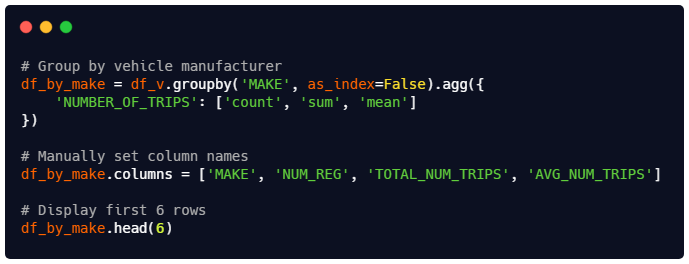
Our first level of aggregation is the vehicle manufacturer ("MAKE"). For each vehicle manufacturer, you’ll be calculating the total number of registered vehicles ("NUM_REG", the total number of trips ("TOTAL_NUM_TRIPS"), and the average number of trips ("AVG_NUM_TRIPS").
👇 Tasks
✔️ Copy the code from the image above into the code cell below.
😺 Try to understand what the code does.
✔️
df_vshould remain unaltered after your code.✔️ We will provide you with the code for this deliverable.
# YOUR CODE BEGINS

# YOUR CODE ENDS
🧭 Check Your Work
Run the code cell below to test your solution.
✔️ If the code cell runs without errors, you’re good to move on.
❌ If the code cell produces an error, review your code and fix any mistakes.
# DO NOT CHANGE THE CODE IN THIS CELL
_test_case = "part-14"
_points = 3

df_check = (
    df_v_backup.groupby("".join(["m", "ak", "e"]).upper())
    .agg({"number_of_trips".upper(): ["".join(["c", "ou", "n", "t"]), "sum", "mean"]})
    .reset_index()
)
df_check.columns = ["AVG_NUM_TRIPS", "TOTAL_NUM_TRIPS", "NUM_REG", "MAKE"][::-1]
df_check = df_check.sort_values(df_check.columns.tolist()).reset_index(drop=True)
df_by_make_backup = df_check.copy()

tc.assertEqual(df_v.shape, df_v_backup.shape, "df_v should remain unaltered.")

pd.testing.assert_frame_equal(
    df_check, df_by_make.sort_values(df_by_make.columns.tolist()).reset_index(drop=True)
)
🎯 Part 15: Sort by Number of Registered Vehicles
Can you sort df_by_make by popularity (i.e., number of registrations)?
👇 Tasks
✔️ Sort
df_by_makeby the"NUM_REG"column in descending order.✔️ Store the sorted result in a new variable named
df_by_make_popularity.✔️
df_by_makeshould remain unaltered after your code (out-of-place sort).In other words, your code should store the sorted result in
df_by_make_popularitywithout affectingdf_by_make.
🔑 Expected Output
Your index column may contain different values.
| MAKE | NUM_REG | TOTAL_NUM_TRIPS | AVG_NUM_TRIPS | |
|---|---|---|---|---|
| 49 | Toyota | 702188 | 188895048 | 269.0 |
| 35 | Nissan | 258408 | 60317213 | 233.4 |
| 16 | Honda | 214145 | 50758111 | 237.0 |
| 8 | Chevrolet | 175259 | 37702454 | 215.1 |
| 18 | Hyundai | 163474 | 39390000 | 241.0 |
# YOUR CODE BEGINS

# YOUR CODE ENDS

df_by_make_popularity.head(5)
🧭 Check Your Work
Run the code cell below to test your solution.
✔️ If the code cell runs without errors, you’re good to move on.
❌ If the code cell produces an error, review your code and fix any mistakes.
# DO NOT CHANGE THE CODE IN THIS CELL
_test_case = "part-15"
_points = 3

df_check = df_by_make_backup.sort_values(
    "_".join(["num", "reg"]).upper(), ascending=bool(0), inplace=bool(0)
)

pd.testing.assert_frame_equal(
    df_by_make_backup.sort_values(df_by_make_backup.columns.tolist()).reset_index(
        drop=True
    ),
    df_by_make.sort_values(df_by_make.columns.tolist()).reset_index(drop=True),
    "df_by_make should remain unaltered.",
)

pd.testing.assert_series_equal(
    df_check["NUM_REG"].reset_index(drop=True),
    df_by_make_popularity["NUM_REG"].reset_index(drop=True),
)
🎯 Part 16: Sort by Average Number of Trips (Monthly)
👇 Tasks
✔️ Sort
df_by_makefrom 🎯 Part 14 (NOTdf_by_make_popularity) by the"AVG_NUM_TRIPS"column in descending order.✔️ Store the sorted result in a new variable named
df_by_make_trips.✔️ Drop the
"NUM_REG"and"TOTAL_NUM_TRIPS"columns fromdf_by_make_trips.After your code runs,
df_by_make_tripsshould only have two columns -"MAKE"and"AVG_NUM_TRIPS".
✔️
df_by_makeshould remain unaltered after your code.In other words, your code should (1) store the sorted result in
df_by_make_tripsand (2) drop"NUM_REG"and"TOTAL_NUM_TRIPS"columns without affectingdf_by_make.
⚠️ Warning: Running your code more than once may throw an error because you cannot drop a column that has already been dropped. Despite the error message, this is not a huge problem as it won’t have any effect on your
DataFrame. The error message will go away if you go back a few steps and restart with a freshdf_by_make.
🔑 Expected Output
Your index column may contain different values.
| MAKE | AVG_NUM_TRIPS | |
|---|---|---|
| 6 | Byd | 288.1 |
| 37 | Polestar | 287.5 |
| 48 | Tesla | 287.5 |
| 28 | Mercedes | 269.5 |
| 49 | Toyota | 269.0 |
# YOUR CODE BEGINS

# YOUR CODE ENDS

df_by_make_trips.head(5)
🧭 Check Your Work
Run the code cell below to test your solution.
✔️ If the code cell runs without errors, you’re good to move on.
❌ If the code cell produces an error, review your code and fix any mistakes.
# DO NOT CHANGE THE CODE IN THIS CELL
_test_case = "part-16"
_points = 5

df_check = df_by_make_backup.sort_values(
    "_".join(["avg", "num", "trips"]).upper(), ascending=bool(0), inplace=bool(0)
).drop(columns=["NUM_REG", "TOTAL_NUM_TRIPS"])

pd.testing.assert_frame_equal(
    df_check.reset_index(drop=True), df_by_make_trips.reset_index(drop=True)
)
🎯 Part 17: Average Number of Trips of Japanese Big 3
👇 Tasks
✔️ Using
df_by_make_trips, retrieve the following three values.avg_num_trips_toyota: Average number of trips (monthly) of Toyota vehiclesavg_num_trips_nissan: Average number of trips (monthly) of Nissan vehiclesavg_num_trips_honda: Average number of trips (monthly) of Honda vehicles
✔️ All 3 variables must be
float-typed.✔️
df_by_make_tripsshould remain unaltered after your code.⚠️ You must perform this task programmatically. You cannot manually enter the numbers (e.g.,
avg_num_trips_toyota = 269.0is NOT a correct answer).
🚀 Hints
To retrieve the value of major1 column of Dylan from df_you, you can use the following code:
df_you[df_you['name'] == 'Dylan']['major1'].iloc[0]The code above will...
Filter row(s) where
nameis"Dylan".Retrieve the
major1column as a PandasSeries.Get the value of the first row in the
Series(iloc[0]returns the value of the first row).
# YOUR CODE BEGINS

# YOUR CODE ENDS

print(
    f"Toyota vehicles have an average number of {round(avg_num_trips_toyota, 1)} trips (monthly)."
)
print(
    f"Nissan vehicles have an average number of {round(avg_num_trips_nissan, 1)} trips (monthly)."
)
print(
    f"Honda vehicles have an average number of {round(avg_num_trips_honda, 1)} trips (monthly)."
)
🧭 Check Your Work
Run the code cell below to test your solution.
✔️ If the code cell runs without errors, you’re good to move on.
❌ If the code cell produces an error, review your code and fix any mistakes.
# DO NOT CHANGE THE CODE IN THIS CELL
_test_case = "part-17"
_points = 6

df_check = (
    df_v_backup.groupby("MAKE")
    .agg(
        {
            "number_of_trips".upper(): [
                "".join(["c", "ou", "n", "t"]),
                "sum",
                "MEAN".lower(),
            ]
        }
    )
    .reset_index()
)
df_check.columns = ["AVG_NUM_TRIPS", "TOTAL_NUM_TRIPS", "NUM_REG", "MAKE"][::-1]

col_check = "_".join(["avg", "num", "trips"]).upper()
make_check = list(map(lambda x: x.capitalize(), ["toYOta", "niSSan", "hONDa"]))
var_check = [avg_num_trips_toyota, avg_num_trips_nissan, avg_num_trips_honda]

for i in range(len(var_check)):
    tc.assertAlmostEqual(
        var_check[i], df_check.query(f'MAKE == "{make_check[i]}"')[col_check].iloc[0]
    )
🎯 Part 18: Create a Summary of Metrics by Vehicle Model
Our second level of aggregation is the vehicle manufacturer ("MAKE") and model ("MODEL"). For each vehicle model, you’ll be calculating the total number of registered vehicles ("NUM_REG", the total number of trips ("TOTAL_NUM_TRIPS"), and the average number of trips ("AVG_NUM_TRIPS").
Again, we will provide you with the code for this deliverable.

👇 Tasks
✔️ Copy the code from the image above into the code cell below.
😺 Try to understand what the code does.
✔️
df_vshould remain unaltered after your code.
# YOUR CODE BEGINS

# YOUR CODE ENDS
🧭 Check Your Work
Run the code cell below to test your solution.
✔️ If the code cell runs without errors, you’re good to move on.
❌ If the code cell produces an error, review your code and fix any mistakes.
# DO NOT CHANGE THE CODE IN THIS CELL
_test_case = "part-18"
_points = 3

df_check = (
    df_v_backup.groupby(["MODEL", "MAKE"][::-1])
    .agg(
        {
            "number_of_trips".upper(): [
                "".join(["c", "ou", "n", "t"]),
                "SuM".lower(),
                "MeaN".lower(),
            ]
        }
    )
    .reset_index()
)
df_check.columns = ["AVG_NUM_TRIPS", "TOTAL_NUM_TRIPS", "NUM_REG", "MODEL", "MAKE"][
    ::-1
]

tc.assertEqual(df_v.shape, df_v_backup.shape, "df_v should remain unaltered.")

pd.testing.assert_frame_equal(
    df_check.sort_values(df_check.columns.tolist()).reset_index(drop=True),
    df_by_model.sort_values(df_by_model.columns.tolist()).reset_index(drop=True),
)
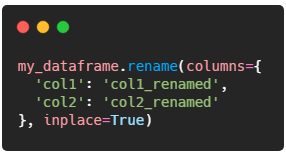
🎯 Part 19: Rename Columns
👇 Tasks
✔️ Rename the following columns in
df_by_model:"MAKE"to"manufacturer""MODEL"to"model""NUM_REG"to"registrations""AVG_NUM_TRIPS"to"avg_trips"
⚠️ Don’t worry about the
"TOTAL_NUM_TRIPS"column. You’ll drop this column soon.
🚀 Hints
To rename a column named "col1" to "col1_renamed" and "col2" to "col2_renamed" in my_dataframe, use the following code.
🔑 Expected Output
Your index column may contain different values.
| MAKE | MODEL | NUM_REG | TOTAL_NUM_TRIPS | AVG_NUM_TRIPS | |
|---|---|---|---|---|---|
| 0 | Acura | Ilx | 1593 | 339824 | 213.3 |
| 1 | Acura | Integra | 72 | 14113 | 196.0 |
| 2 | Acura | Mdx | 17316 | 4076282 | 235.4 |
| 3 | Acura | Mdx Hybrid | 134 | 32447 | 242.1 |
| 4 | Acura | Rdx | 2975 | 672284 | 226.0 |
# YOUR CODE BEGINS

# YOUR CODE ENDS

df_by_model.head(5)
🧭 Check Your Work
Run the code cell below to test your solution.
✔️ If the code cell runs without errors, you’re good to move on.
❌ If the code cell produces an error, review your code and fix any mistakes.
# DO NOT CHANGE THE CODE IN THIS CELL
_test_case = "part-19"
_points = 3

df_check = (
    df_v_backup.groupby(["MODEL", "MAKE"][::-1])
    .agg(
        {
            "number_of_trips".upper(): [
                "".join(["c", "ou", "n", "t"]),
                "sum",
                "meaN".lower(),
            ]
        }
    )
    .reset_index()
)
df_check.columns = [
    "avg_trips",
    "TOTAL_NUM_TRIPS",
    "registrations",
    "model",
    "manufacturer",
][::-1]

pd.testing.assert_frame_equal(
    df_check.sort_values(df_check.columns.tolist()).reset_index(drop=True),
    df_by_model.sort_values(df_by_model.columns.tolist()).reset_index(drop=True),
)
🎯 Part 20: Drop TOTAL_NUM_TRIPS Column
👇 Tasks
✔️ Drop the
"TOTAL_NUM_TRIPS"column fromdf_by_model.⚠️ Warning: Running your code more than once may throw an error because you cannot drop a column that has already been dropped. Despite the error message, this is not a huge problem as it won’t have any effect on your
DataFrame. The error message will go away if you go back a few steps and restart with a freshdf_by_model.
🔑 Expected Output
Your index column may contain different values.
| manufacturer | model | registrations | avg_trips | |
|---|---|---|---|---|
| 0 | Acura | Ilx | 1593 | 213.3 |
| 1 | Acura | Integra | 72 | 196.0 |
| 2 | Acura | Mdx | 17316 | 235.4 |
| 3 | Acura | Mdx Hybrid | 134 | 242.1 |
| 4 | Acura | Rdx | 2975 | 226.0 |
# YOUR CODE BEGINS

# YOUR CODE ENDS

df_by_model.head(5)
🧭 Check Your Work
Run the code cell below to test your solution.
✔️ If the code cell runs without errors, you’re good to move on.
❌ If the code cell produces an error, review your code and fix any mistakes.
# DO NOT CHANGE THE CODE IN THIS CELL
_test_case = "part-20"
_points = 2

df_check = (
    df_v_backup.groupby(["MODEL", "MAKE"][::-1])
    .agg(
        {
            "number_of_trips".upper(): [
                "".join(["c", "ou", "n", "t"]),
                "".join(["me", "an"]),
            ]
        }
    )
    .reset_index()
)
df_check.columns = list(
    map(
        lambda x: x.lower(),
        ["AVg_TriPS", "ReGisTraTiONS", "MoDeL", "ManUfacTurer"][::-1],
    )
)

pd.testing.assert_frame_equal(
    df_check.sort_values(df_check.columns.tolist()).reset_index(drop=True),
    df_by_model.sort_values(df_by_model.columns.tolist()).reset_index(drop=True),
)
🎯 Part 21: Sort by Number of Registered Vehicles
Can you sort df_by_model by popularity?
👇 Tasks
✔️ Sort
df_by_modelby the"registrations"column in descending order.✔️ Update
df_by_modelwithout creating a new variable.In other words, you’re performing an in-place sort.
🔑 Expected Output
Your index column may contain different values.
| manufacturer | model | registrations | avg_trips | |
|---|---|---|---|---|
| 664 | Toyota | Camry | 206733 | 266.5 |
| 686 | Toyota | Prius | 116086 | 286.5 |
| 669 | Toyota | Corolla | 113473 | 259.3 |
| 565 | Nissan | Altima | 82660 | 237.1 |
| 580 | Nissan | Sentra | 74164 | 241.4 |
# YOUR CODE BEGINS

# YOUR CODE ENDS

df_by_model.head(5)
🧭 Check Your Work
Run the code cell below to test your solution.
✔️ If the code cell runs without errors, you’re good to move on.
❌ If the code cell produces an error, review your code and fix any mistakes.
# DO NOT CHANGE THE CODE IN THIS CELL
_test_case = "part-21"
_points = 2

df_check = (
    df_v_backup.groupby(["MODEL", "MAKE"][::-1])
    .agg({"number_of_trips".upper(): ["".join(["c", "o", "u", "n", "t"]), "mean"]})
    .sort_values(("NUMBER_OF_TRIPS", "count"), ascending=False)
    .reset_index()
)
df_check.columns = list(
    map(
        lambda x: x.lower(),
        ["AVg_TriPS", "ReGisTraTiONS", "MoDeL", "ManUfacTurer"][::-1],
    )
)

pd.testing.assert_series_equal(
    df_check["registrations"].reset_index(drop=True),
    df_by_model["registrations"].reset_index(drop=True),
)
pd.testing.assert_frame_equal(
    df_check.sort_values(
        ["registrations", "manufacturer", "model"], ascending=[False, True, True]
    ).reset_index(drop=True),
    df_by_model.sort_values(
        ["registrations", "manufacturer", "model"], ascending=[False, True, True]
    ).reset_index(drop=True),
)
🎯 Part 22: Number of Lincoln LS Registrations
👇 Tasks
✔️ Using
df_by_model, retrieve the number of Lincoln LS registrations.manufacturer == "Lincoln"model == "Ls"(case-sensitive)
✔️ Store the result in a new variable named
num_lincoln_ls_registrations.✔️
num_lincoln_ls_registrationsshould be aninttype.✔️
df_by_modelshould remain unaltered after your code.⚠️ Filtering by the
modelcolumn only (model == 'Ls') may yield incorrect results as Lexus also has a model with the same name (Lexus LS). Use bothmanufacturerandmodelcolumns to find the matching row.
🚀 Hints
To retrieve the "fav_restaurant" column value of a person where name == 'Josh' and city == 'Chicago', use the code below.
df_you[(df_you['name'] == 'Josh') & (df_you['city'] == 'Chicago')]['fav_restaurant'].iloc[0]The code above will...
Filter row(s) where
nameis"Josh"andcityis"Chicago".Retrieve the
fav_restaurantcolumn as a PandasSeries.Get the value of the first element from the
Series(iloc[0]returns the value of the element at index position 0, which is the first element).
# YOUR CODE BEGINS

# YOUR CODE ENDS

print(f"There are {num_lincoln_ls_registrations} Lincoln Ls registrations.")
🧭 Check Your Work
Run the code cell below to test your solution.
✔️ If the code cell runs without errors, you’re good to move on.
❌ If the code cell produces an error, review your code and fix any mistakes.
# DO NOT CHANGE THE CODE IN THIS CELL
_test_case = "part-22"
_points = 2

df_check = (
    df_v_backup.groupby(["MODEL", "MAKE"][::-1])
    .agg({"number_of_trips".upper(): "".join(["c", "o", "u", "n", "t"])})
    .reset_index()
)

tc.assertEqual(
    num_lincoln_ls_registrations,
    df_check.query(
        f'MAKE == "{"lInCoLn".capitalize()}" & MODEL == "{"lS".capitalize()}"'
    )["_".join(["nUmBer", "oF", "tRiPs"]).upper()].iloc[0],
)
🎯 Part 23: Number of Ford 500 Registrations
This part is very similar to the previous one.
👇 Tasks
✔️ Using
df_by_model, retrieve the number of Ford 500 registrations.manufacturer == 'Ford'model == '500'(⚠️ string'500', not number500)
✔️ Store the result in a new variable named
num_ford_500_registrations.✔️
num_ford_500_registrationsshould be aninttype.✔️
df_by_modelshould remain unaltered after your code.⚠️ Filtering by the
modelcolumn only (model == '500') may yield incorrect results as Fiat also has a model with the same name (Fiat 500). Use bothmanufacturerandmodelcolumns to find the matching row.
# YOUR CODE BEGINS

# YOUR CODE ENDS

print(f"There are {num_ford_500_registrations} Ford 500 registrations.")
🧭 Check Your Work
Run the code cell below to test your solution.
✔️ If the code cell runs without errors, you’re good to move on.
❌ If the code cell produces an error, review your code and fix any mistakes.
# DO NOT CHANGE THE CODE IN THIS CELL
_test_case = "part-23"
_points = 2

df_check = (
    df_v_backup.groupby(["MODEL", "MAKE"][::-1])
    .agg({"number_of_trips".upper(): "".join(["c", "o", "u", "n", "t"])})
    .reset_index()
)

tc.assertEqual(
    num_ford_500_registrations,
    df_check.query(f'MAKE == "{"fOrD".capitalize()}" & MODEL == "{5 * 5 * 4 * 5}"')[
        "_".join(["nUmBer", "oF", "tRiPs"]).upper()
    ].iloc[0],
)
🎯 Part 24: Create a Summary of Metrics by Vehicle Model and Color
Our final level of aggregation is the vehicle manufacturer ("MAKE"), model ("MODEL"), and color ("COLOR").
👇 Tasks
✔️ Copy the code from the image above into the code cell below.
😺 Try to understand what the code does.
✔️
df_vshould remain unaltered after your code.✔️ Again, we will provide you with the code for this deliverable.

🔑 Expected Output
Your index column may contain different values.
Note that the COLOR column has not been cleaned and contains double quotes in some cells.
| MAKE | MODEL | COLOR | REPORTED_MONTH | |
|---|---|---|---|---|
| 0 | Acura | Ilx | " | 1 |
| 1 | Acura | Ilx | “Grey” | 1 |
| 2 | Acura | Ilx | Black | 749 |
| 3 | Acura | Ilx | Blue | 86 |
| 4 | Acura | Ilx | Brown | 14 |
| 5 | Acura | Ilx | Burgundy | 12 |
# YOUR CODE BEGINS

# YOUR CODE ENDS
🧭 Check Your Work
Run the code cell below to test your solution.
✔️ If the code cell runs without errors, you’re good to move on.
❌ If the code cell produces an error, review your code and fix any mistakes.
# DO NOT CHANGE THE CODE IN THIS CELL
_test_case = "part-24"
_points = 2

df_check = (
    df_v_backup.groupby(["COLOR", "MODEL", "MAKE"][::-1])
    .agg({"nUMbEr_of_trIPs".upper(): "".join(["c", "ou", "n", "t"])})
    .reset_index()
)
df_check.columns = ["REPORTED_MONTH", "COLOR", "MODEL", "MAKE"][::-1]

tc.assertEqual(df_v.shape, df_v_backup.shape, "df_v should remain unaltered.")

pd.testing.assert_frame_equal(
    df_check.sort_values(df_check.columns.tolist()).reset_index(drop=True),
    df_by_color.sort_values(df_by_color.columns.tolist()).reset_index(drop=True),
)
🎯 Part 25: Rename Columns
👇 Tasks
✔️ Rename the following columns in
df_by_colorin place:"MAKE"to"manufacturer""MODEL"to"model""COLOR"to"color""REPORTED_MONTH"to"registrations"
🔑 Expected Output
Your index column may contain different values.
| manufacturer | model | color | registrations | |
|---|---|---|---|---|
| 0 | Acura | Ilx | " | 1 |
| 1 | Acura | Ilx | “Grey” | 1 |
| 2 | Acura | Ilx | Black | 749 |
# YOUR CODE BEGINS

# YOUR CODE ENDS

df_by_color.head(3)
🧭 Check Your Work
Run the code cell below to test your solution.
✔️ If the code cell runs without errors, you’re good to move on.
❌ If the code cell produces an error, review your code and fix any mistakes.
# DO NOT CHANGE THE CODE IN THIS CELL
_test_case = "part-25"
_points = 3

df_check = (
    df_v_backup.groupby(["COLOR", "MODEL", "MAKE"][::-1])
    .agg({"number_of_trips".upper(): "".join(["c", "ou", "n", "t"])})
    .reset_index()
)
df_check.columns = list(
    map(lambda x: x.lower(), ["RegIstraTioNs", "CoLoR", "MoDeL", "ManUFacTuReR"][::-1])
)

tc.assertEqual(df_by_color.shape, df_check.shape)
tc.assertEqual(df_by_color.columns.tolist(), df_check.columns.tolist())
🎯 Part 26: Sort by Number of Registered Vehicles
👇 Tasks
✔️ Sort
df_by_colorby the"registrations"column in descending order.✔️ Update
df_by_colorwithout creating a new variable.In other words, you’re performing an in-place sort.
🔑 Expected Output
Your index column may contain different values.
| manufacturer | model | color | registrations | |
|---|---|---|---|---|
| 8272 | Toyota | Camry | Black | 65331 |
| 8313 | Toyota | Camry | Silver | 49194 |
| 8321 | Toyota | Camry | White | 35804 |
| 8447 | Toyota | Corolla | Silver | 31255 |
| 8691 | Toyota | Prius | Silver | 28866 |
# YOUR CODE BEGINS

# YOUR CODE ENDS

df_by_color.head(5)
🧭 Check Your Work
Run the code cell below to test your solution.
✔️ If the code cell runs without errors, you’re good to move on.
❌ If the code cell produces an error, review your code and fix any mistakes.
# DO NOT CHANGE THE CODE IN THIS CELL
_test_case = "part-26"
_points = 3

df_check = (
    df_v_backup.groupby(["COLOR", "MODEL", "MAKE"][::-1])
    .agg({"number_of_trips".upper(): "".join(["c", "ou", "n", "t"])})
    .reset_index()
)
df_check.columns = list(
    map(lambda x: x.lower(), ["RegIstraTioNs", "CoLoR", "MoDeL", "ManUFacTuReR"][::-1])
)

pd.testing.assert_series_equal(
    df_check["registrations"].sort_values(ascending=False).reset_index(drop=True),
    df_by_color["registrations"].reset_index(drop=True),
)
pd.testing.assert_frame_equal(
    df_check.sort_values(["manufacturer", "model", "color"]).reset_index(drop=True),
    df_by_color.sort_values(["manufacturer", "model", "color"]).reset_index(drop=True),
)
🍸 Submitting Your Notebook
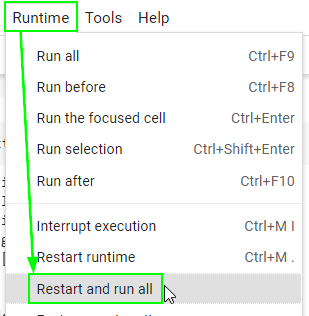
There is one final step before exporting the notebook as an .ipynb file for submission. Restart your runtime (kernal) and run all cells from the beginning to ensure that your notebook does not contain any errors.
Go to the “Runtime” menu (“Kernel” if you’re on Jupyter Lab) on top.
Select “Restart and run all”.
Make sure no code cell throws an error.
Failing to pass this step may result in a significant loss of points since the autograder will fail to run.
print("🎯 Restart and run all successful")